


2026 Digital Planner Portrait
2026 Digital Planner Portrait
Couldn't load pickup availability
Meet our 2026 Digital Planner – the ultimate iPad planner that will help you stay organized, productive, and inspired every day! 🐈🌱 You can finally say goodbye to boring planning and embrace a digital experience where everything you need is right at your fingertips. 📝✨🌷
📅 Now with Apple Calendar, Google Calendar and Reminders App Integration for iPadOS devices! (The version without integration is included in the purchase)🥰
Our 2026 Portrait Digital Planner helps you organize every aspect of your life—from personal goals and work tasks to finances and notes—all in one convenient place. ✨ It's fully hyperlinked, dated for 2026 and features a cute, minimalist design, making planning fun and motivating. 😊🌱
✨📝Planner highlights:
- 7 side-tab colors 🎨
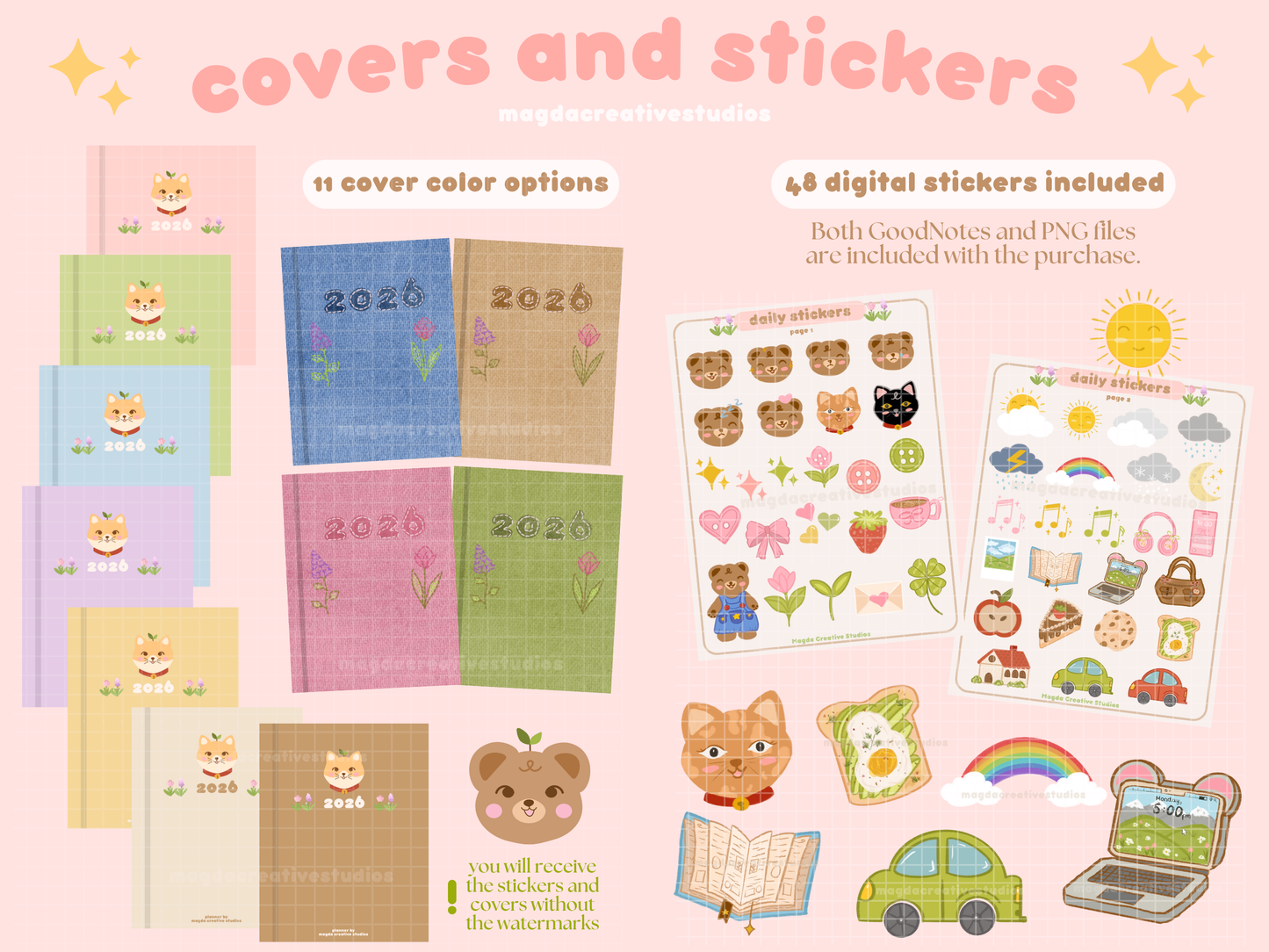
- 11 cover options included 📔
- 48 cute digital stickers included 🐻
- Daily, weekly, monthly & yearly planning pages 🌷
- Weekly and monthly linked journaling pages 📝
- App integrations for iPadOS devices 📱
Watch the Download & Setup Video Tutorial here. 🥰
For a full list of the planner pages and templates please look at the "What is included" list below. 🩷
This is a DIGITAL DOWNLOAD PLANNER so you will not receive any physical product. After you purchase you will be able to download a PDF file that contains the Planner download links, GoodNotes upload instructions and instructions for the integration.
- If you have questions about how the planner works, how to customise it or if you run into any issues, please don't hesitate to reach out via email at magdacreativestudios@gmail.com. I am more than happy to help you out!💞
Copyright © 2026, Magda Creative Studios. All rights reserved.
Product Features
Product Features
🎨 Cover colors & side tabs
This year there are 7 color variants available for the side tabs - pink, green, blue, purple, beige, brown and a new buttery pastel yellow. 💛🩷💚 Also, this year there are 11 cover variants included - 7 solid classic colours and 4 new fabric textured covers. 😊
🐻Stickers
And because we know how important customization is, a set of 48 digital stickers is also included with the planner. 🤭🐻 They are 100% hand-drawn by me and they will come in 3 formats : PNG files, GoodNotes file and GoodNotes Elements collection for easy upload.🎨🌱
📱Easy Navigation
You can quickly and easily navigate through the planner's various sections using the side tabs and the navigation menu in the top right corner. 🥰 It contains more than 2000 hyperlinks that make it super easy to navigate all its 642 pages. 🧚✨
📝 New pages
This year, we’ve added 13 new productivity templates, 4 new yearly pages and 10 custom notebook sections, giving you even more ways to plan and organize every area of your life. 🤭🐻
Also, each week of the year has a corresponding weekly reflection page that is linked in the weekly planner.📖 This page makes it super easy to start journaling and keep all your favorite photos, memories, ideas and thoughts in one place. 📝🌷
📅App Integration
The 2026 planners now contain Apple Calendar, Google Calendar and Reminders app Integration for iPadOS devices! ✨📝(The version without integration is included with the purchase) The integration does NOT sync your planner with these apps but it allows you to easily add events and reminders directly from the planner. 🥰
📝Daily Organisation:
🕰️ With dedicated sections for your daily schedule, to-do lists, priorities, and notes, you can efficiently manage your day from start to finish. Keep track of your appointments, meetings, and important tasks effortlessly.
✨Comprehensive Compatibility:
📱 Our daily planner comes in PDF format, making it ideal for GoodNotes or any other PDF annotation app ( Notability, NoteShelf, CollaNote, Samsung Notes, Penly, etc.) on various devices - iPad/tablet, phone, laptop or desktop.
What is included
What is included
⭐️ Monthly, weekly & daily templates:
- Daily planner
- Weekly planner
- Weekly reflection
- Monthly habit tracker
- Monthly goal planner
- Monthly budget planners
- Monthly reflection
- Monthly letter to future you
- Monthly vision board
- Monthly brain dump
🌱 36 Productivity templates (13 new templates):
- Vision board
- Habit tracker
- Goal setting
- Brain dump
- Mood tracker
- Daily journal
- Workout planner
- Meal planner
- Budget planner
- Reading log
- Travel plans
- My favorites
- Letter to future me
- 4 Bucket list pages for all seasons of the year
- Packing list
- Favourite music
- Podcast list
- Movies tracker
- Tv series tracker
- Outfit planner
- My routines
- 5 recipe pages
- Vitamins and supplements
🩷The 13 new productivity pages:
- About me page
- Medication tracker
- Sleep tracker
- Dream log
- Wishlist
- Gift planner
- Plant care cards
- Plant tracker
- Hobbies hub
- Hobby tracker
- Content bank
- Dopamine menu
- Ins and outs
⭐️ Yearly templates (4 new templates):
- 2026 calendar - linked to all the weeks and days of the year
- 2026 monthly goals
- 2026 finances
- Important dates
🩷The 4 new pages:
- 2026 goal setting page
- 2026 in photos
- 2026 bingo card
- 2026 vision board
📝 10 note-taking spreads:
- Dotted
- Blank
- Grid
- Lined
- Cornell
- To-do list
- Dotted + empty
- Grid + empty
- Lined + empty
- Cornell + empty
🌱New - 10 custom sections to create mini notebooks within the planner
📔11 cover options - 7 classic solid colours & 4 fabric textured covers
🎨7 color tab options: pink, green, blue, purple, yellow, cream, brown
📝2 planner variants - with and without app integration
🐻48 hand-drawn digital stickers in PNG and GoodNotes formats
How it works
How it works
To use this planner you will need to have the GoodNotes app installed (or Notability / NoteShelf / CollaNote / Samsung Notes / Penly ).
✨You will receive a PDF file that contains the Planner download links and instructions, GoodNotes upload instructions and integration installation instructions.
You will need to install the integration separately using the Shortcuts app.
A video and text step-by-step tutorial is included with your purchase in the PDF.
Shop policies
Shop policies
Because of the digital nature of our products, all sales are final therefore we don't offer refunds, exchanges or cancellations. Please contact us with any questions before purchasing.
This product is for PERSONAL USE ONLY. These are original files and they are protected by the Copyright and Trademark laws. You may not resell, copy, distribute, alter, share or give away the original files for commercial use nor use any portion of the files to create a new design to resell.
Share


El planificador de Magda es, sencillamente, perfecto. Lo tiene todo: estética, practicidad y es muy intuitivo.
Gracias por lanzar este producto!! 🩷🩷
I needed a planner that included several sections to organize myself and this is the cutest, most complete one I found. Def worth the money!
It’s easy to install and directions are easy to read. comes with cute stickers! Super simple and love how it looks on GoodNotes, will be buying planners from them in the future 💝!
I love it so cute and easy to use!